


100% Real UiPath-ADAv1 dumps - Brilliant UiPath-ADAv1 Exam Questions PDF
UiPath-ADAv1 Exam PDF [2026] Tests Free Updated Today with Correct 384 Questions
NEW QUESTION # 225
What are the components of a process?
- A. Inputs, Process Flows, Source Applications, Outputs.
- B. Technical Skills, Business Processes, Decision Points.
- C. Compliance, Operational Needs, Risk Management, Improvement.
- D. Procedures, Dependencies, Variations, Resources.
Answer: A
Explanation:
The components of a process typically include "Inputs, Process Flows, Source Applications, Outputs". This refers to what the process takes as input (data/files), the sequence of steps or activities that define the process (process flows), the applications involved in the process (source applications), and what the process produces or affects (outputs).
References:
UiPath Studio Guide: Project Organization Best Practices
NEW QUESTION # 226
When should a static selector be used versus a dynamic selector'?
- A. When the selector needs to interact with different types of elements on the same page
- B. When a standard selector contains an attribute value that changes for each execution
- C. When all the attributes or tags remain the same for each execution
- D. When a standard selector contains a tag value that changes for each execution
Answer: C
Explanation:
A static selector should be used when all the attributes or tags remain the same for each execution. A static selector is a selector that has fixed values for the attributes or tags of the target element. A static selector can reliably identify the target element as long as the element does not change its properties or position on the screen. A static selector is suitable for simple and stable UI elements that have consistent and unique selectors1. For example, a static selector can be used to click on a button that has the same name and ID every time the automation runs.
References: Static Selectors and Selectors from UiPath documentation.
NEW QUESTION # 227
What is the expected behavior when execution is started from UiPath Studio in Debug mode with a breakpoint on a Type Into activity?
- A. The execution pauses until the user clicks the Continue button.
- B. The execution pauses for 5 seconds when it encounters the breakpoint.
- C. The execution ignores the breakpoint.
- D. The execution throws an exception.
Answer: A
Explanation:
# Reference:
* UiPath Documentation: Debugging Workflows
NEW QUESTION # 228
You are invoking a workflow file called "SecondaryWorkflow.xaml" from "PrimaryWorkflow.xamr. The following shows the Import Arguments panel of the Invoke Workflow File activity: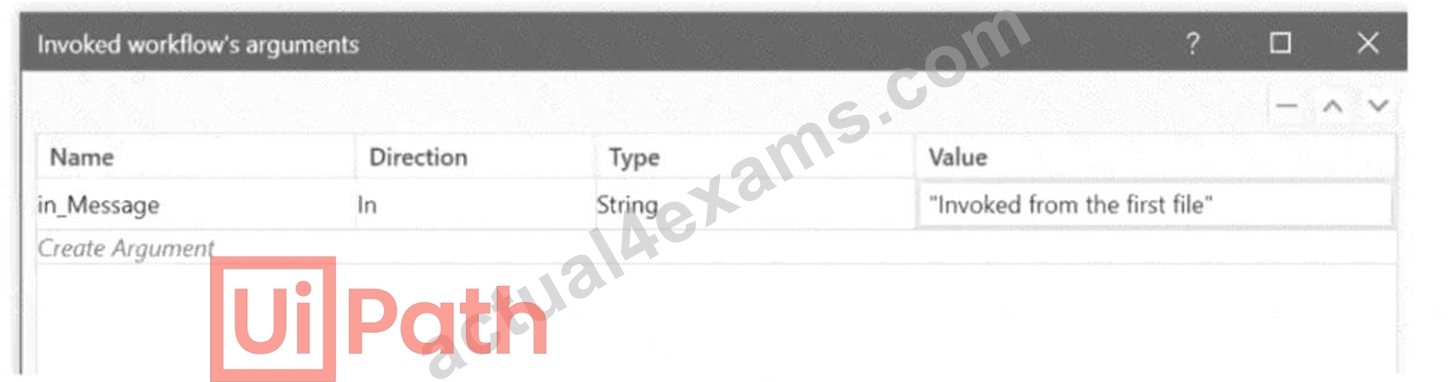
In addition, the following reflects the Arguments panel in ''SecondaryWorkflow.xaml":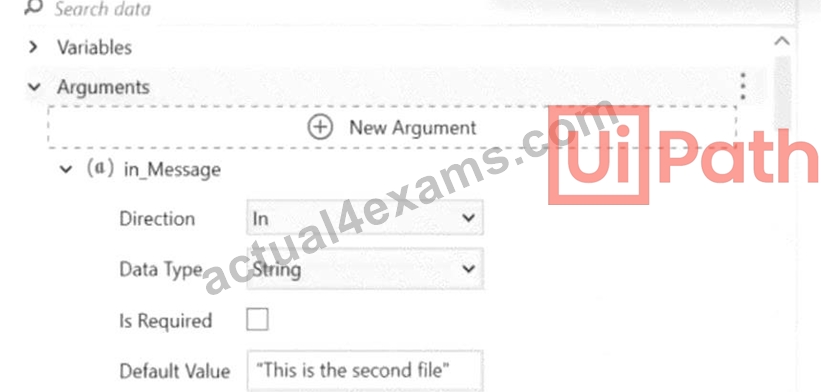
You use a Log Message activity in "SecondaryWorkflow.xamr to print the value of the argument
"in_Message". What is the expected result of executing "PrimaryWorkflow.xaml"?
- A. A System.ArgumentException is thrown at the Invoke Workflow File activity.
- B. Log message "This is the second file".
- C. Log message "Invoked from the first file".
- D. The Log Message activity displays an empty string.
Answer: C
Explanation:
In the given scenario, the "SecondaryWorkflow.xaml" is invoked from "PrimaryWorkflow.xaml" with an argument "in_Message". The Import Arguments panel of the Invoke Workflow File activity in
"PrimaryWorkflow.xaml" is showing that the value "Invoked from the first file" is passed to
"SecondaryWorkflow.xaml". Since the "SecondaryWorkflow.xaml" has an argument "in_Message" with the default value "This is the second file", this default value is overridden by the value provided during the invoke action. Therefore, when the Log Message activity in "SecondaryWorkflow.xaml" is executed, it will log
"Invoked from the first file", making option B correct.
References:
UiPath Studio Guide: Invoking a Workflow
NEW QUESTION # 229
What is true about the behavior of the Read Range Workbook activity?
- A. It works only with .xls files, and Excel does not need to be installed on the system.
- B. It works with .xls and .xlsx files, and Excel does not need to be installed on the system.
- C. It works with .xlm and .xlsx files, and Excel must be installed on the system.
- D. It works only with .xlsm files, and Excel must be installed on the system.
Answer: B
Explanation:
The Read Range Workbook activity is part of the UiPath.Excel.Activities package and allows reading Excel data without requiring Excel to be installed.
Why Option C is Correct?
* Supports both .xls (Excel 97-2003) and .xlsx (Excel 2007+) formats.
* Works without installing Microsoft Excel, using UiPath's built-in Workbook activities.
* Faster execution because it does not rely on the Excel application.
Why Other Options Are Incorrect?
* A (Only .xls and Excel not needed) #
* .xlsx files are also supported in Workbook activities.
* B (Only .xlsm and requires Excel) #
* .xlsm (macro-enabled) files can be read, but Excel is NOT required for reading non-macro content.
* D (xlm instead of xlsm) #
* .xlm is not a valid Excel format.
References:
* UiPath Official Docs - Read Range Workbook
* UiPath Forum - Excel without Installation
NEW QUESTION # 230
What is the Endpoint when configuring a REST Message?
- A. The URI of the Webserver
- B. The command to the REST script to stop execution
- C. The provider response indicates there is no data to send back
- D. The URI of the data to be accessed, queried, or modified
Answer: D
Explanation:
Comprehensive and Detailed Explanation:
In ServiceNow, when configuring a REST Message, an Endpoint refers to the specific URI (Uniform Resource Identifier) where a web service resource is available. This URI is used to access, query, or modify the data in an external system via REST API calls.
* Option A (Incorrect): The provider response is unrelated to defining an endpoint. The response from the REST provider is received after sending a request, but it does not define where data is accessed.
* Option B (Correct): The Endpoint in a REST message is the URI that specifies the location of the resource being accessed, queried, or modified. When configuring a REST Message in ServiceNow, the endpoint is set in the Endpoint field of the REST Message record, determining where requests will be sent.
* Option C (Incorrect): REST APIs do not have a specific "stop execution" command as part of their standard operations. Instead, they follow HTTP methods (GET, POST, PUT, DELETE) to perform actions on resources.
* Option D (Incorrect): While the web server hosts the API, the endpoint is more specific-it includes the full URI path to the resource within that web server. For example, if a web server hosts an API at
https://api.example.com, an endpoint might be https://api.example.com/users/123 to retrieve user data.
Example of an Endpoint in ServiceNow REST Message Configuration:
plaintext
CopyEdit
https://api.example.com/users
This endpoint would be used to send REST API requests to retrieve or modify user data.
NEW QUESTION # 231
Given the following list of arguments: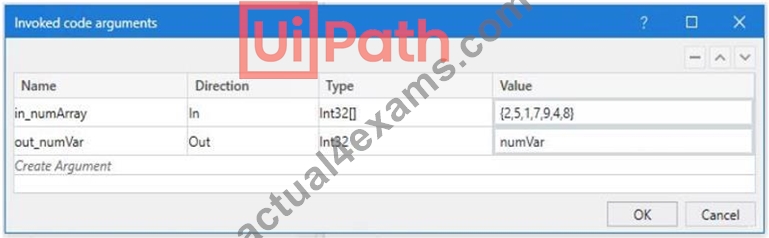
And the following code: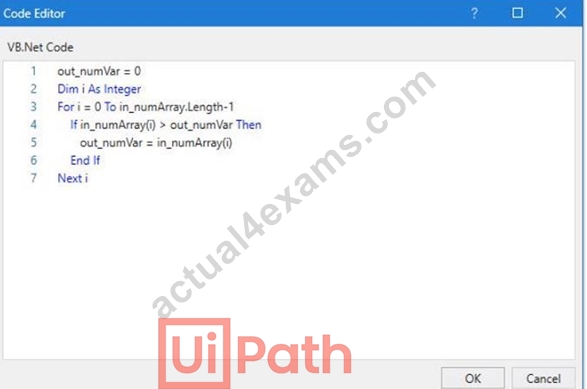
What is the value that will be displayed in the Output Panel at the end of the sequence below: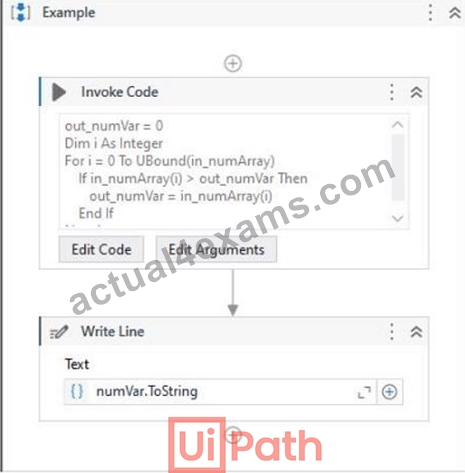
- A. 0
- B. 1
- C. 2
- D. 3
Answer: D
Explanation:
Explanation
The code in the Invoke Code activity is looping through an array of integers and checking if the current value is greater than the previous value. If it is, the current value is stored in the output variable. Since the last value in the array is 9, this will be the final value of the output variable. (UiPath Studio - Invoke Code - UiPath Academy) References:
Studio - Invoke Code - UiPath Documentation Portal
UiPath Studio - Invoke Code - UiPath Academy
NEW QUESTION # 232
Which of the following statements correctly describes the characteristics of Unattended Automation?
- A. Unattended Automations are intended for smaller, fragmented tasks and run with user supervision, requiring the user's credentials for access.
- B. Unattended Automation are automations that run under human supervision and, because of this, are best suited for small tasks.
- C. Unattended Automations are automations that run under human supervision and are typically used for tasks requiring a clear audit chain.
- D. Unattended Automations are automations intended for more complex and highly repetitive tasks, usually performed in batches, and can be decided based on predefined rules.
Answer: D
Explanation:
Unattended Automations are intended for complex, highly repetitive tasks that are usually performed in batches. They can operate without human supervision and decisions can be made based on predefined rules.
These tasks can run on virtual environments and do not require human input once started.
NEW QUESTION # 233
A developer is building a process that needs to click an element which requires a mouse hover to become visible. However, the element does not appear with the default click setting. The input method for the Click activity is Send Window Message Which property should the developer configure to be able to click the element?
- A. The property AlterlfDisabled should be set to True.
- B. The property AlterlfDisabled should be set to False.
- C. The developer should change the input method to Simulate and the CursorMotionType to Instant.
- D. The developer should change the input method to Hardware Events and the CursorMotionType to Smooth.
Answer: D
Explanation:
The input method for the Click activity determines how the click is performed on the target element. The Send Window Message input method is fast and reliable, but it does not support hovering over elements. Therefore, the developer should use the Hardware Events input method, which simulates the real mouse and keyboard actions. The CursorMotionType property specifies how the cursor moves to the target element. The Smooth option makes the cursor move in a natural way, which can trigger the hover effect on the element. (UiPath Studio documentation12) References:
1: Input Methods - UiPath Studio.
2: Click - UiPath Activities.
NEW QUESTION # 234
Which option best describes a process that is considered SEMI-AUTOMATION?
- A. Processes where change is frequent, the system environment is volatile, and multiple manual (even non-digital) actions are required.
- B. Processes that can be broken down into steps that can be clearly automated, and steps that need to stay manual (such as validations or usage of physical security tokens).
- C. Processes that are digital and involve a highly static system and process environment, so that they can be easily broken into instructions and simple triggers can be defined.
- D. Processes that are rather digital and can be automated, but use some technologies that are complex (such as OCR) or require advanced programming skills.
Answer: B
Explanation:
A process that is considered semi-automation is one where certain steps can be automated while others must remain manual. This may include actions such as validations or the use of physical security tokens that cannot be automated. Therefore, the best description of semi-automation is option D.
NEW QUESTION # 235
To retrieve all Outlook emails with the word "UiPath" in the subject, which filtering property and filter schema should a developer use?
- A. Property: Filter
Schema: "@SQL=""urn:schemas:httpmail:subject"" like '%UiPath%"" - B. Property: Filter
Schema: "@SQL=""urn:schemas:httpmail:subject"" like 'UiPath%"" - C. Property: FilterByMessagelds
Schema: "@SQL=""urn:schemas:httpmail:subject"" like 'UiPath%"" - D. Property: FilterByMessagelds
Schema: "@SQL=""urn:schemas:httpmail:subject"" like '%UiPath%""
Answer: A
Explanation:
Explanation
To retrieve all Outlook emails with the word "UiPath" in the subject, a developer should use the Filter property and the filter schema "@SQL=""urn:schemas:httpmail:subject"" like '%UiPath%'". The Filter property allows developers to specify a DASL query that filters the emails based on various criteria, such as subject, sender, date, etc. The filter schema "@SQL=""urn:schemas:httpmail:subject"" like '%UiPath%'" uses the SQL dialect of DASL to search for emails that have the word "UiPath" anywhere in the subject. The "%" symbol is a wildcard that matches any character or string. (UiPath Automation Developer study guide) References:
Get Outlook Mail Messages
Chapter 11: Searching Outlook Data | Microsoft Learn
NEW QUESTION # 236
A developer wants to assign the first row of the "ID" column in the "DT" datatable to a String variable. Which expression should be added to the Value field of the Assign activity?
- A. DTColumns(0) ("ID")
- B. DTRows(0)ID
- C. DTColumns(0)ID
- D. DTRows(0). ltem("ID")
Answer: D
Explanation:
To assign the first row of the "ID" column in the "DT" datatable to a String variable, the expression that should be added to the Value field of the Assign activity is:
DT.Rows(0).Item("ID")
This expression accesses the value of the "ID" column in the first row of the "DT" datatable using the Rows and Item properties. The Rows property returns a collection of DataRow objects that represent the rows in the datatable. The Item property returns or sets the value of the specified column in the DataRow object1. The expression uses the index 0 to refer to the first row in the Rows collection, and the column name "ID" to refer to the specific column in the Item property. The expression returns the value of the "ID" column in the first row as an Object type, which can be converted to a String type using the ToString method2. For example, if the "DT" datatable has the following values:
ID
Name
1
John
2
Mary
3
Bob
Then the expression DT.Rows(0).Item("ID") will return 1 as the value of the "ID" column in the first row.
References: DataTable.Rows Property and DataRow.Item Property from UiPath documentation.
NEW QUESTION # 237
Which is an example of when an application might use a Scheduled Script Execution (Scheduled Job)?
- A. To validate form input fields before a record is submitted.
- B. The application needs to query the database every day to look for unassigned records.
- C. The application needs to run a client-side script at the same time every day.
- D. To display a custom welcome message when a user logs in.
Answer: B
Explanation:
Comprehensive and Detailed Explanation:
In ServiceNow, a Scheduled Script Execution, commonly referred to as a Scheduled Job, is a server-side script that runs at a specified time or on a recurring schedule. These are particularly useful for automating routine tasks, maintenance, or any activity that needs to occur at regular intervals without manual intervention.
* Option A (Incorrect): Displaying a custom welcome message when a user logs in is an action that occurs in real-time, triggered by the user's login event. This would typically be handled by a Login Interceptor or a client-side script, not by a Scheduled Job.
* Option B (Correct): Running a daily query to identify unassigned records is a classic use case for a Scheduled Job. By setting up a script to execute at a specific time each day, the system can automatically perform this database query and take appropriate actions, such as notifying users or reassigning tasks.
* Option C (Incorrect): Client-side scripts run in the user's browser and are designed to manage user interactions on forms and pages. Scheduling a client-side script to run at a specific time daily is not feasible, as it would require the user's browser to be active and the relevant page to be loaded at that exact time.
* Option D (Incorrect): Validating form input fields before submission is an immediate action that ensures data integrity and user feedback in real-time. This is typically managed by client-side scripts or UI policies that trigger upon form submission, not by Scheduled Jobs.
Therefore, the most appropriate scenario for using a Scheduled Script Execution is when an application needs to perform regular, automated tasks on the server side, such as querying the database daily for unassigned records.
References:
* ServiceNow Documentation: Scheduled Script Executions
NEW QUESTION # 238
A developer designed an automation to use an Asset value from Orchestrator using the Get Asset activity. The value represents email addresses of the process owners which may change.
Which Asset Type should be used?
- A. Credential
- B. Bool
- C. Integer
- D. Text
Answer: D
Explanation:
The Asset Type that should be used for storing email addresses of the process owners is Text. Text assets are used to store only string values, such as names, addresses, URLs, etc. Text assets can be easily retrieved and updated using the Get Asset and Set Asset activities in UiPath Studio. Text assets are suitable for storing email addresses, as they can contain alphanumeric characters, symbols, and special characters. Text assets can also be used in various activities that require string input or output, such as Send Email, Write Line, Assign, etc.
NEW QUESTION # 239
A developer wants to assign the first row of the "ID" column in the "DT" datatable to a String variable. Which expression should be added to the Value field of the Assign activity?
- A. DTColumns(0) ("ID")
- B. DTRows(0)ID
- C. DTColumns(0)ID
- D. DTRows(0). ltem("ID")
Answer: D
Explanation:
To assign the first row of the "ID" column in the "DT" datatable to a String variable, the expression that should be added to the Value field of the Assign activity is:
DT.Rows(0).Item("ID")
This expression accesses the value of the "ID" column in the first row of the "DT" datatable using the Rows and Item properties. The Rows property returns a collection of DataRow objects that represent the rows in the datatable. The Item property returns or sets the value of the specified column in the DataRow object1. The expression uses the index 0 to refer to the first row in the Rows collection, and the column name "ID" to refer to the specific column in the Item property. The expression returns the value of the "ID" column in the first row as an Object type, which can be converted to a String type using the ToString method2. For example, if the "DT" datatable has the following values:
ID
Name
1
John
2
Mary
3
Bob
Then the expression DT.Rows(0).Item("ID") will return 1 as the value of the "ID" column in the first row.
NEW QUESTION # 240
Which activity should be used inside a Use Excel File scope to be able to sort a table directly in an .xlsx file?
- A. Sort Range
- B. Get Table Range
- C. Sort Data Table
- D. Read Range
Answer: A
Explanation:
Sorting data directly in an Excel file requires modifying the Excel sheet itself, which is handled using the Sort Range activity.
Why is A Correct?
# Sort Range is designed to:
* Sort a specific range of cells or a table in an .xlsx file.
* Work within the Use Excel File scope to directly modify Excel content.
* Maintain Excel formatting while sorting.
NEW QUESTION # 241
A developer wants to create a process using a Flow Switch activity. What is a feature of this activity?
- A. Default case is executed before the expression is evaluated
- B. Supports up to three expressions by default
- C. Default case is executed if no cases match the expression
- D. Two Default cases can be defined
Answer: C
Explanation:
The Flow Switch activity is a conditional node that provides branching for the flow of control based on a match criterion when more than two alternative branches are required. The Flow Switch activity has an Expression property that can be of any type, and a dictionary of Cases that consists of pairs of keys and activities. The Flow Switch activity evaluates the Expression and compares it against each of the keys in the Cases. If a match is found, the corresponding activity is executed. If no match is found, the Default case is executed, if it is defined. The Default case is an optional activity that serves as a fallback option when none of the cases match the expression. Therefore, the answer is D. Default case is executed if no cases match the expression. References: Flow Switch, About Control Flow
NEW QUESTION # 242
Which selector should be adjusted according to best practices to ensure reliable and stable automation?
- A. <html app='chrome.exe' title='ACME System 1 - Download monthly Report' />
<webctrl aaname- Year 200?' parentid='searchForm' class='texf /> - B. <html app-chrome.exe' title-World population - Wikipedia' />
<webctrl aaname-Population by continent' tag-TABLE7>
<webctrl tableCol='3' tableRow='7' tag-TD7> - C. <html app-chrome.exe' title-Google' !>
<webctrl tag-INPUT' aaname='Search' /> - D. <html app-chrome.exe' title-Release History - UiPath Platform'/>
<webctrl parentid-confluence-ui' tag='SPAN' idx-94'/>
Answer: A
Explanation:
Selectors should be dynamic, unique, and stable to prevent failures due to UI changes.
Why Option C is Correct?
<html app='chrome.exe' title='ACME System 1 - Download monthly Report' />
<webctrl aaname='Year 200?' parentid='searchForm' class='text' />
* Uses a specific title (ACME System 1 - Download monthly Report), which ensures uniqueness.
* Uses parentid (searchForm) to enhance stability.
* Uses a meaningful aaname (Year 200?), making it dynamic for different years.
Why Other Options Are Incorrect?
* A (idx-94 is used) #
* idx values are unstable and can change when elements are reloaded.
* B (Table-based selector) #
* tableRow and tableCol values can change dynamically, making automation unreliable.
* D (title-Google' !> is broken) #
* Incorrect syntax (!> is invalid), making the selector unstable.
References:
* UiPath Best Practices - Selectors
* UiPath Academy - Dynamic Selectors
NEW QUESTION # 243
......
UiPath UiPath-ADAv1 Exam Syllabus Topics:
| Topic | Details |
|---|---|
| Topic 1 |
|
| Topic 2 |
|
| Topic 3 |
|
| Topic 4 |
|
| Topic 5 |
|
| Topic 6 |
|
| Topic 7 |
|
| Topic 8 |
|
| Topic 9 |
|
| Topic 10 |
|
| Topic 11 |
|
Verified & Correct UiPath-ADAv1 Practice Test Reliable Source May 01, 2026 Updated: https://www.actual4exams.com/UiPath-ADAv1-valid-dump.html
UiPath UiPath-ADAv1 Exam Preparation Guide and PDF Download: https://drive.google.com/open?id=1QdCzznFwZcflrNqIk1ENUXoGUDehyCKS